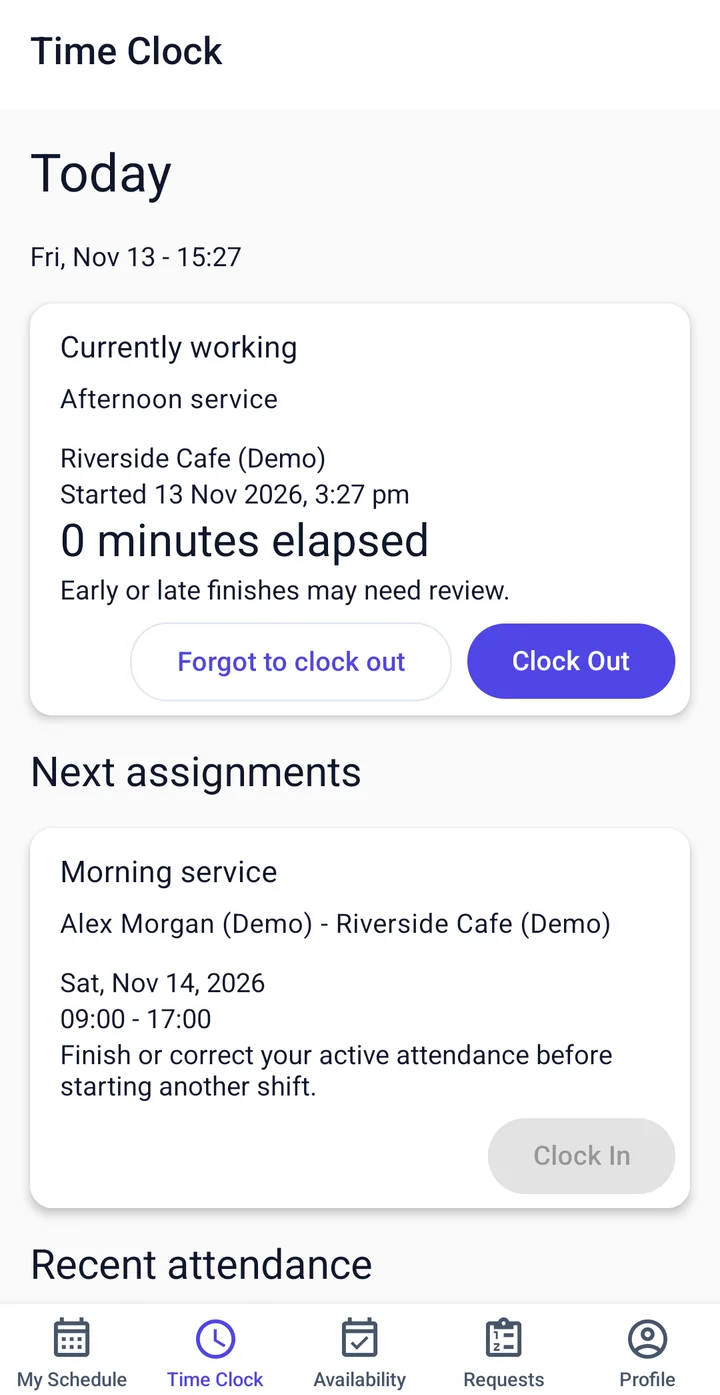
Clock in to the correct assignment
Before starting work, a worker opens Time Clock and checks the assignment, workplace, and date. Clock-in availability follows the business's timing rules. Once clocked in, the app shows the active attendance session and a clock-out action.
At the end of the work period, the worker clocks out and can review the saved attendance. This is different from marking a scheduled shift as worked: the attendance record captures the actual clock-in and clock-out, subject to manager review.
Handle a missed punch without hiding the problem
If someone forgets to clock in or out, use the correction workflow and submit the actual time for review. A manager should check the shift, the worker's explanation, and any available attendance information before approving a correction. Avoid creating a second session just to work around an unfinished one.
Clear internal guidance helps: tell workers when to clock in, how to end the session, and whom to contact if the phone or connection causes a problem. Rostr support can help investigate app issues, but your manager remains responsible for confirming working time.
Use GPS check-in only where it fits
On Growth and Business, managers can enable location-based check-in for a site and configure the permitted area. Workers need the required device location permission and must meet the site's check-in rules. GPS is optional; manual clock-in and clock-out are available on the free plan.
Check the site settings and explain location use to your team before enabling it. Do not confuse a location check at clock-in with a promise of continuous location tracking. Read the privacy policy for the app's data practices.
Review approved hours before exporting
Reports collect approved attendance within a selected date range. Weekly reports and CSV export start on Starter; monthly reporting and payroll summaries are available on Growth, with advanced reporting on Business. Compare reporting by plan and review exceptions before using the numbers in your payroll process.
Rostr helps organize time records. It is not a substitute for checking employment rules, wage calculations, or the requirements of your payroll provider.